
USB Serial vs UART
The ESP32-S3-DevKitC-1 features two Micro-USB ports with different capabilities. Understanding when to use each is essential for development.
Port Overview
| Port Label | IC | GPIO | Capabilities |
|---|---|---|---|
| USB (J2) | Native ESP32-S3 | GPIO19/20 | USB-OTG, USB-Serial/JTAG, HID |
| UART (J4) | CP2102N | U0TXD/U0RXD | Traditional serial, reliable flashing |
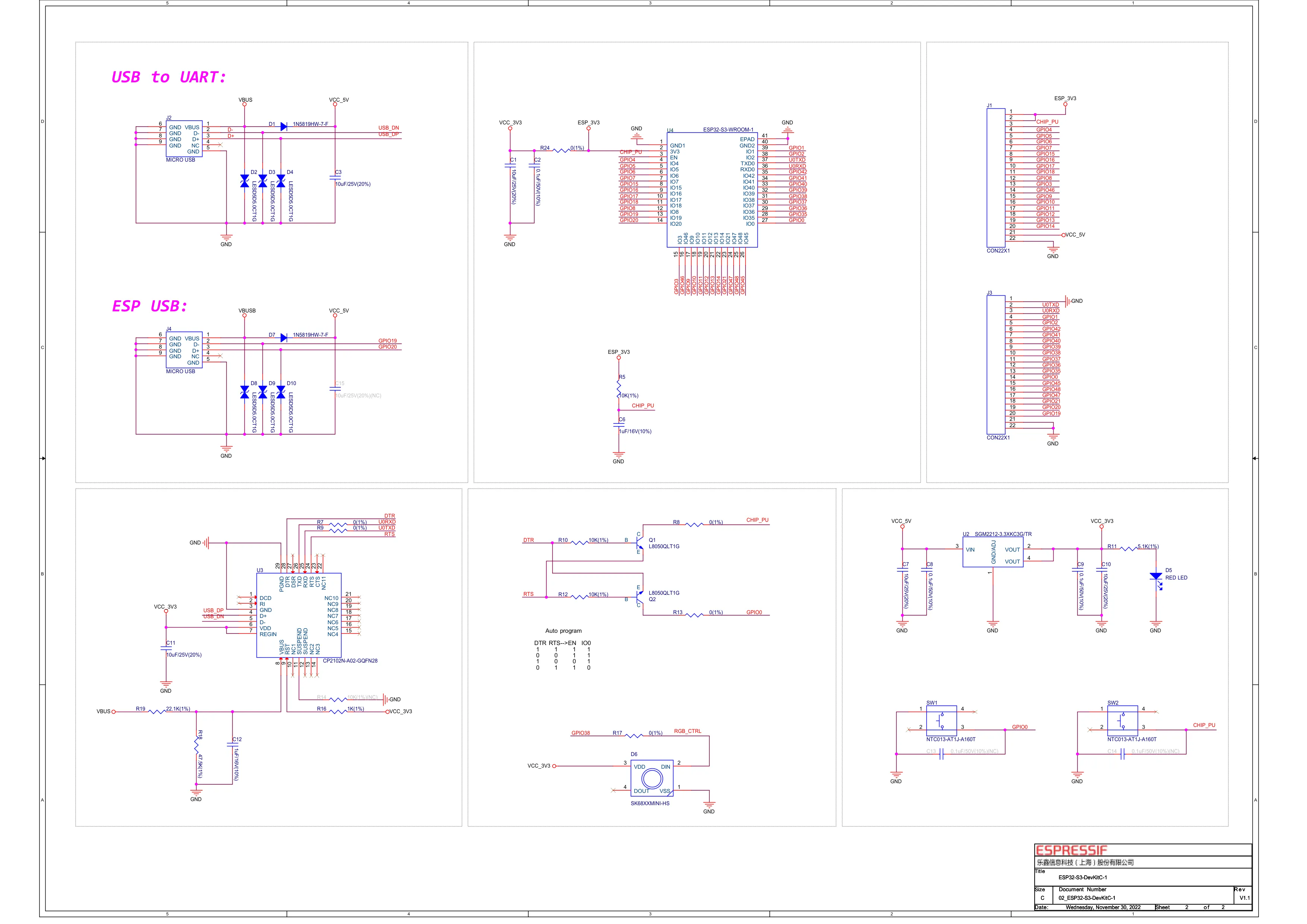
CP2102N UART Port
The UART port provides traditional serial communication:
Features
- Reliable programming with
esptool.py - Automatic reset/boot via DTR/RTS
- Works without any ESP32-S3 USB configuration
- Compatible with all standard serial monitors
Use When
- Programming new/unknown boards
- When USB stack crashes
- Debugging boot issues
- Using traditional serial libraries
Typical Usage
# Flash via UART portesptool.py -p /dev/ttyUSB0 write_flash 0x0 firmware.bin
# Monitor via UARTidf.py -p /dev/ttyUSB0 monitor# orpio device monitor --port /dev/ttyUSB0
Native USB Port
The USB port connects directly to the ESP32-S3’s USB peripheral:
Features
- USB-CDC: Virtual serial port (faster than UART)
- USB-JTAG: Built-in debugging without external probe
- USB-OTG: Host mode for keyboards, storage, etc.
- USB Device: HID, MSC, custom USB devices
USB Modes
| Mode | Description | GPIO19/20 |
|---|---|---|
| USB-Serial/JTAG | Console + debug | Dedicated |
| USB-OTG Device | Custom USB device classes | Dedicated |
| USB-OTG Host | Connect USB peripherals | Dedicated |
| GPIO (disabled) | Regular GPIO pins | Available |
Configuration
Arduino/PlatformIO
# USB-CDC Serial (native USB as Serial)build_flags =    -DARDUINO_USB_MODE=1    -DARDUINO_USB_CDC_ON_BOOT=1
# USB-JTAG for debuggingbuild_flags =    -DARDUINO_USB_MODE=1    -DARDUINO_USB_CDC_ON_BOOT=0
# Disable native USB (use GPIO19/20)build_flags =    -DARDUINO_USB_MODE=0
ESP-IDF menuconfig
Component config →  ESP System Settings →    Channel for console output →      [*] USB Serial/JTAG Controller      [ ] USB CDC
  Driver configurations →    USB Serial/JTAG →      [*] Enable USB Serial/JTAG
USB-CDC Serial Example
Using native USB as a fast serial port:
#include <Arduino.h>
void setup() {    // USB-CDC initializes automatically with ARDUINO_USB_CDC_ON_BOOT=1    Serial.begin(115200);
    // Wait for USB connection    while (!Serial) {        delay(10);    }
    Serial.println("USB-CDC Ready!");}
void loop() {    if (Serial.available()) {        String input = Serial.readStringUntil('\n');        Serial.print("Received: ");        Serial.println(input);    }}
USB-OTG Device Example
Create a USB HID keyboard:
#include <USB.h>#include <USBHIDKeyboard.h>
USBHIDKeyboard Keyboard;
void setup() {    Keyboard.begin();    USB.begin();}
void loop() {    // Press a key every 5 seconds    delay(5000);    Keyboard.print("Hello from ESP32-S3!");    Keyboard.write(KEY_RETURN);}
USB Host Mode
The native USB port supports USB host mode for connecting peripherals (keyboards, flash drives, serial adapters). This requires a hardware modification — see the dedicated tutorial:
USB Host Mode Tutorial Hardware setup, OTG jumper, ESP-IDF class drivers (HID, MSC, CDC, UVC)
Simultaneous Usage
You can use both ports simultaneously:
#include <Arduino.h>
// Serial = USB-CDC (native USB)// Serial0 = UART0 (CP2102N)
void setup() {    Serial.begin(115200);   // USB-CDC    Serial0.begin(115200);  // UART
    Serial.println("USB-CDC output");    Serial0.println("UART output");}
void loop() {    // Echo between ports    if (Serial.available()) {        Serial0.write(Serial.read());    }    if (Serial0.available()) {        Serial.write(Serial0.read());    }}
Debugging with USB-JTAG
The native USB port provides built-in JTAG debugging:
OpenOCD Configuration
# ESP-IDF includes OpenOCDopenocd -f board/esp32s3-builtin.cfgVS Code Launch Configuration
{ "version": "0.2.0", "configurations": [ { "type": "espidf", "name": "ESP32-S3 Debug", "request": "launch", "debugPort": 3333, "logLevel": 2, "openOCDLaunchRecipe": "board/esp32s3-builtin" } ]}Comparison Table
| Feature | UART Port (CP2102N) | USB Port (Native) |
|---|---|---|
| Speed | Up to 3 Mbps | 12 Mbps (Full Speed) |
| Programming | esptool, reliable | Possible, needs USB stack |
| Debugging | Serial only | Built-in JTAG |
| Reset Control | DTR/RTS auto-reset | Software reset only |
| USB Device | No | Yes (HID, MSC, etc.) |
| USB Host | No | Yes (with OTG adapter) |
| Driver Required | CP210x driver | None (built-in) |
| Boot Recovery | Always works | Needs working firmware |
Troubleshooting
Native USB Not Working
- Verify USB cable is data-capable
- Check build flags include USB configuration
- Try the UART port to flash correct firmware
Cannot Enter Download Mode via USB
Use the UART port and manually trigger download mode:
- Hold BOOT button
- Press and release RST
- Release BOOT
- Flash via UART
USB-CDC Serial Drops Connection
- Check power supply stability
- Reduce USB traffic rate
- Add connection recovery in code:
void loop() { if (!Serial) { // USB disconnected, wait for reconnection while (!Serial) delay(10); Serial.println("Reconnected!"); } // Normal operation}Next Steps
- USB Host Mode — connect keyboards, flash drives, cameras
- ESP-IDF Setup
- PlatformIO Configuration
- Schematic Reference